469
How to protect messages in Telegram so that no one reads them
In the past few months, the brainchild of Durov faced an unprecedented influx of new users. Some came to Telegram because of the blocking of social networks by Roskomnadzor. Others search for relevant news without censorship or propaganda. So now is the time to make sure that communication in the messenger became really safe and private. We tell you how to protect messages in Telegram so that no one reads them.

In chats that Telegram uses by default, end-to-end encryption is not used. What does that mean? In short, the service has access not only to metadata, but also to the entire text of your correspondence.

At the moment, on the assurances of Telegram, this information is not provided to third parties. But the privacy policy can change at any time. At the same time, end-to-end encryption in the application is still there. That’s just to use it, you will have to climb deeper into the settings than usual.
How to create a “secret” chat Open the profile of your interlocutor. Find a button on the top right with three dots. In the menu that appears, select “Start Secret Chat.”
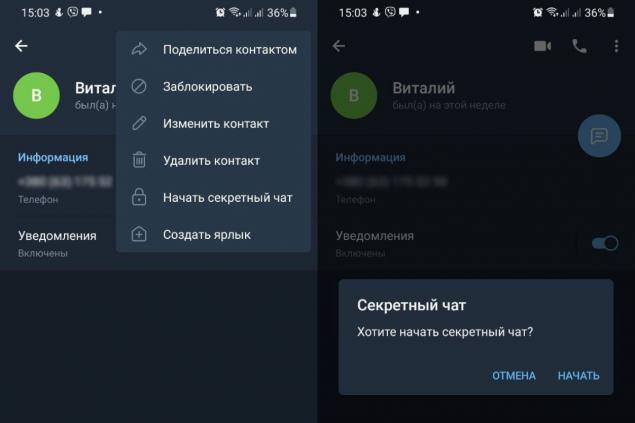
After that, the program will once again specify: “Do you want to start a secret chat?” Click "Start" and go to the window for correspondence. All messages in this chat are encrypted, leave no traces on the servers and are deleted by timer.
To make your account more secure, follow the instructions below. To do this, go to the menu and select “Settings” at the bottom. It's easy to recognize him by his gear badge.
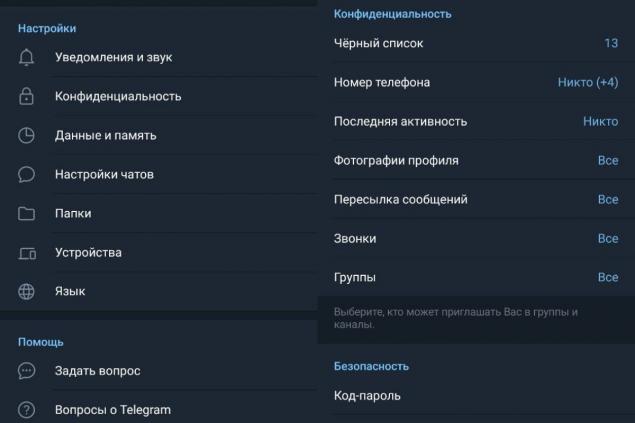
First of all, make sure that your correspondence is not read if you leave your unlocked phone unattended. To do this, open the “Privacy” section.
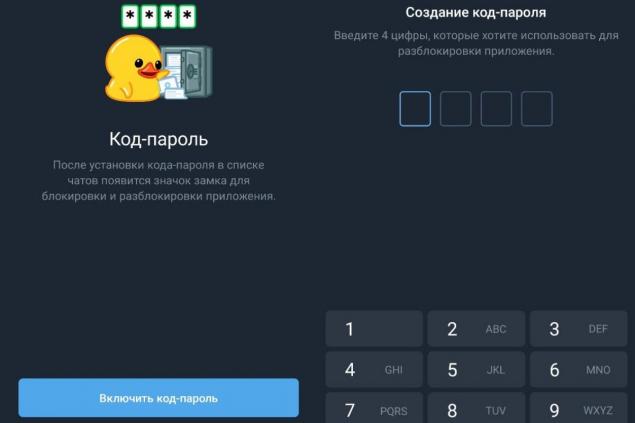
Then select "Password Code" and click "Enable Password Code". The program will ask you to enter four digits that you will use to unlock it. Come up with a memorable code, specify it and confirm it.
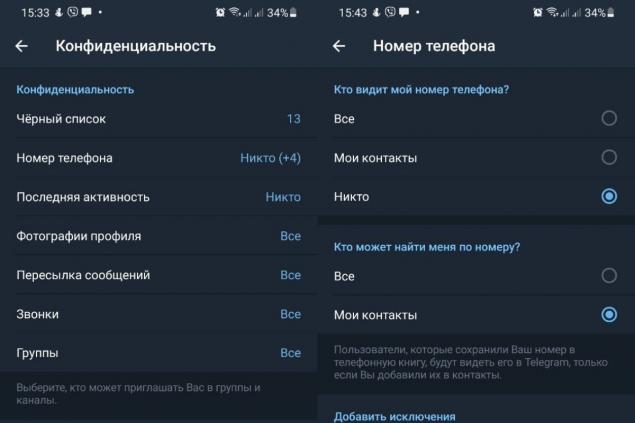
In the same section "Privacy" go to the subsection "Phone number". In the “Who Sees the Phone Number” field, select “Nobody.” In the field "Who can find me by number" select "My contacts".
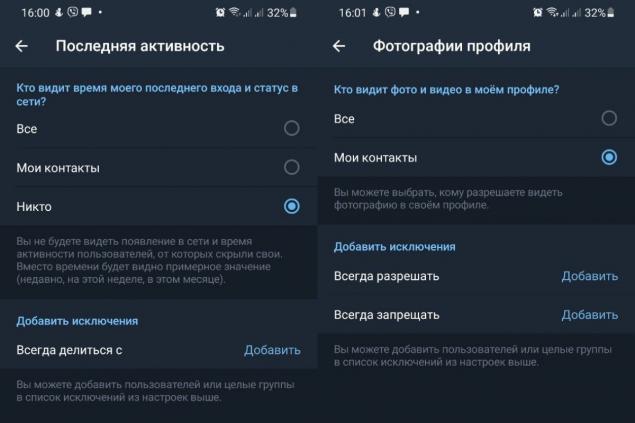
Go to the “Last Activity” section. In the field "Who sees my last login time and status on the network" mark the item "Nobody". “Who sees photos and videos in my profile” – put “My contacts”.
Is it possible to monitor a person using the microphone and the camera of his smartphone? Experts say it's possible. And it can do not only attackers, but also harmless, at first glance, advertisers. More and more people want to keep their data private. For them, we tell you how to identify and disable wiretapping on the phone.
Reviewing the incredible performance of Olympic champions and dream to be the same cheerful at 80 years old
Experienced flower growers answer the question why a capricious orchid refuses to bloom