1745
Analysis of 404 pages of top-error stores Runet
Creation, configuration and design of the 404 pages is an important task, and the element content should be worked out in every more or less serious commercial site. What is interesting, in many cases only focus on the visual component, but a question of web analytics vyskolzaet attention from developers.
I decided to see how this thing implemented in RuNet - namely, the site from the list of top 10 largest online retailers Rosii rating compiled by Forbes.
In online stores with attendance at hundreds of thousands, analyst 404 th page - a very important step in the data analysis. In this context, there are several options:
- The page is the code of Google Analytics, then they can track and analyze; Google Analytics Script is not at all; Is Google Analytics with additional settings (_setcustomvar, _trackpageview , _trackevent); Track 404 is performed with the use of other mechanisms; You can add logical substitute words, when a person enters a query with an error.
- Reduction% out of the search page, or 404; Increase the number of page views; Increase the amount of time spent on the site; Increased micro and makrokonversy.
If the track conversions on 404 th page with Google Analytics, you can find so broken links, configure the desired redirects, experimenting with drawing this content element, and monitor results.
Ulmart.ru
When you try to set a non-existent page on Ulmart.ru, you will see a message stating that this page is not found, and you will most likely mistyped the address or whether it is simply removed from the site. Below you can see a recommendation to go to the home page, and the link.
Smiled picture meme Jackie Chan, which obviously should distract you from sad reflection on the subject, Page Where did you tried to go.
Google Analytiics script is not connected.
Citilink.ru
The site "Citylink" you will find the perfect minimalism: the logo in the top corner of the site, and in the middle of the page inscription in large letters that this page does not, but you can go to the directory and find for himself something interesting.
Google Analytics is present, but 404 is not tracked.
Wildberries.ru
Beautifully and thoughtfully implemented Page 404-error online Wildberries.ru - except for the logo of the site you will see a description of several variants of the reasons that may have a problem, as well as a nice bonus - a promotional code for 5% discount in a special section! Perhaps, Wildberries.ru - one of the most interesting implementations of this special page.
Google Analytics is not connected and the page is not being tracked.
Ozon.ru
The site "Ozone" pretty simple and not creative - a message about a non-existent page recommendation and go to the home, menu, or use the search.
404 page monitored by the script:
& lt; code class = & quot; javascript & quot; & gt; & lt; script type = & quot; text / javascript & quot; & gt; // & Lt;! [CDATA [defaultSearchText = ''; needClearSearch = false; _gaq.push (['_ setCustomVar', 5, 'User_priznak', 'Ne_Opoznan', 1]); _ gaq.push (['_ setCustomVar', 5, 'User_type', 'Fiz', 1]); _ gaq.push ( ['_setCustomVar', 5, 'Status', 'No', 1]); _ gaq.push (['_ setCustomVar', 4, '', '/ Oshibka 404 / Oshibka 404', 3]); _ gaq.push ( ['_trackPageview', '/virtual/wetsdry/error404.html']);//]]> & Lt; / script & gt; & Lt; / code & gt;
Biglion.ru
Here designers have worked, adding to the text of the error and offer an interesting image to go to the special offer.
Use Google Tag Manager, so there just can not say anything.
Holodilnik.ru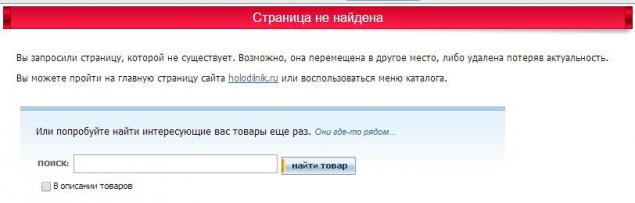
Unlike the previous, this online store so creativity is not happy. As can be seen in the screenshot above, decorated all pretty standard.
Google Analytics script is present, but the page is not being tracked.
Technopoint.ru On this site page 404, and the user does not see, as in the recruitment of a non-existent address just redirect to the main work. Or, in the case of goods, on the category page.
Enter.ru
Originally worked out 404 page and "Enter" - a nice picture in one of the primary colors of the site, a line of search and offer to call, and large button at the bottom to go home.
Google Analytics script connected:
& lt; code class = & quot; javascript & quot; & gt; _gaq.push (['_ trackPageview', '/ page404' + location.pathname]); _gaq.push (['_ trackEvent', 'Errors', '404', nowURL]); & Lt; / code & gt;
220-volt.ru
In store "220 Volt" more pragmatic - Dry message about possible due to the lack of the page and go to the main proposal, catalog or site map. Neatly fits into the overall design of the site, and after a few seconds triggers a redirect to the home.
Use Google Tag Manager, so the situation is similar to the "Biglionom".
Utkonos.ru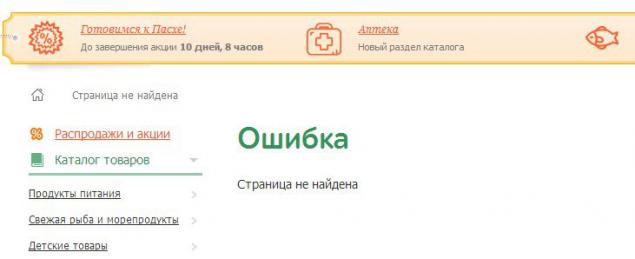
But here on the principle that all ingenious is simple - two lines and four words :)
Google Analytics script is present, but the page is not being tracked.
Not at all sites Page 404 implemented on general principles and guidelines, and if one can see the standard solution, on the other it is clear that the content of this element really did a good job. In terms of analysts 404-page situation for each online store is also different.
The reference online store, you can take a well-known Zappos.com
For the test, we introduce, for example, this address: www.zappos.com/dfgdfgdfg
And the results obtained:
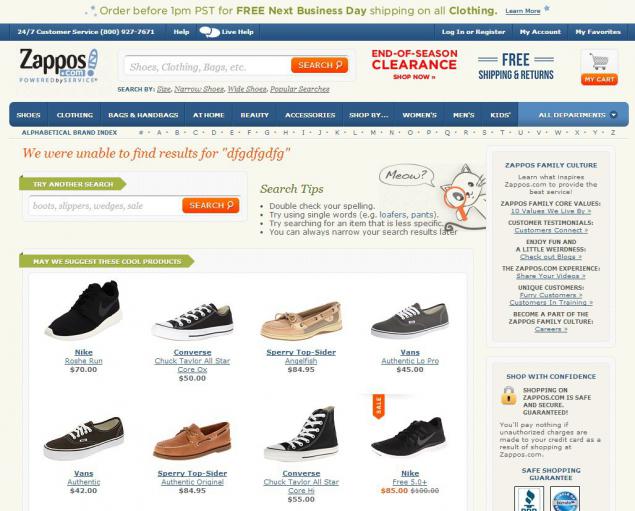
Implementation of tracking is carried out by means of such a script:
& lt; code class = & quot; javascript & quot; & gt; & lt; script type = & quot; text / javascript & quot; & gt; var showTerm = true; $ LAB .script ('/ search / js / main.p.20140218110728.js') .wait () .script ('/ search / js / noResults.p.20140219144546.js') .wait (); window.terms = & quot; dfgdfgdfg & quot ;; var _gaq = _gaq || []; _gaq.push (['pageTrackerPriTr._setAccount', 'UA-8814898-1'], ['pageTrackerPriTr._setDomainName', '.zappos.com'], ['pageTrackerPriTr._setAllowHash', false]); var _gaq = _gaq || []; _gaq.push (/*pad*/['pageTrackerPriTr._setCustomVar ', 1,' PageType ',' Search-No-Results', 3], /*pad*/['pageTrackerPriTr._trackEvent ',' Search-Results- Page ', 0,' dfgdfgdfg '], /*pad*/['pageTrackerPriTr._trackPageview', '/ no-results? terms = dfgdfgdfg & amp; cat = noresults']); (Function () {var ga = document.createElement ('script'); ga.type = 'text / javascript'; ga.async = true; ga.src = ('https:' == document.location.protocol? 'https: // ssl': 'http: // www') + '.google-analytics.com / ga.js'; (document.getElementsByTagName (' head ') [0] || document.getElementsByTagName (' body ') [0]). appendChild (ga);}) (); & Lt; / script & gt; & Lt; / code & gt;
It keeps track of all the pages that do not work in the form of an existing page on the site, that is not only 404, but the search for failed requests.
Interestingly realized delivery of results in the recruitment of failed requests in the search. For example. typing in the search box on the store request "nikr", the script parses the products / categories on the site, and as a result shows those which are most similar to the query entered by the user. As a result, on-demand "nikr" you will see "Nike":
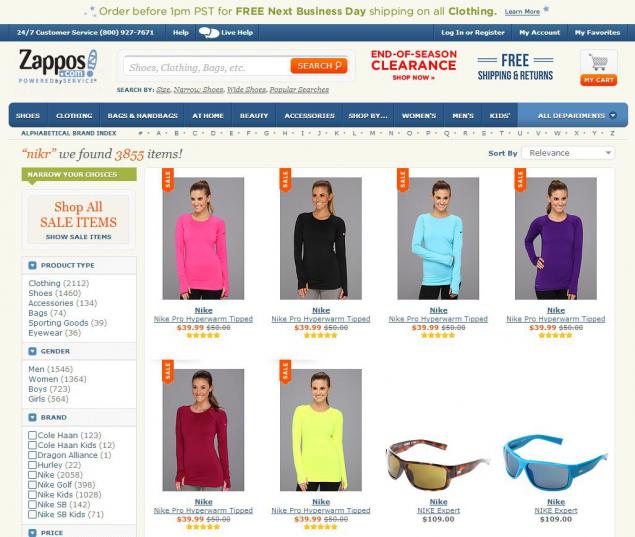
www.zappos.com/nikr
What is interesting, judging by this script fragment:
& lt; code class = & quot; javascript & quot; & gt; _gaq.push (/*pad*/['pageTrackerPriTr._setCustomVar ', 1,' PageType ',' Search-Results', 3], / * pad * / ['pageTrackerPriTr._trackEvent', & quot; Search-Results-Page & quot ;, & quot; 3853 & quot ;, & quot; Search-nikr & quot;], /*pad*/['pageTrackerPriTr._trackPageview ',' / esearch? term = nikr '] & lt; / code & gt;
the analyst does not fix such requests as erroneous, and considers them to be the correct result.
So that foreign colleagues in the shop have a lot to learn, and, of course, with a detailed analysis of Zappos.com and other major online stores of world-class, you can find a lot of interesting features that can be adapted and applied on your own site or client projects.
Source: habrahabr.ru/post/219061/
- Reduction% out of the search page, or 404; Increase the number of page views; Increase the amount of time spent on the site; Increased micro and makrokonversy.
If the track conversions on 404 th page with Google Analytics, you can find so broken links, configure the desired redirects, experimenting with drawing this content element, and monitor results.
