1095
6 little-known but very useful Excel functions

Microsoft Excel for today is simply indispensable, especially when it comes to handling large amounts of data. However, this program features so much that is not easy to understand what they are really necessary and useful.
And so today Website
DataPilot With the help of pivot tables is very convenient sort, calculate the amount and receive the average of the spreadsheet data, with no formula output is not necessary.
< How to apply:
Select Insert & gt; Featured summary tables dialog box, featured pivot tables OK
Seek If you know what the result of a formula you need, but can not determine the input values, allowing it to receive, use the selection tool.
< How to apply:
Click Data & gt; Job Data & gt; An analysis of "what-if» & gt; Seek Set in the cell Value Changing the value cell OK
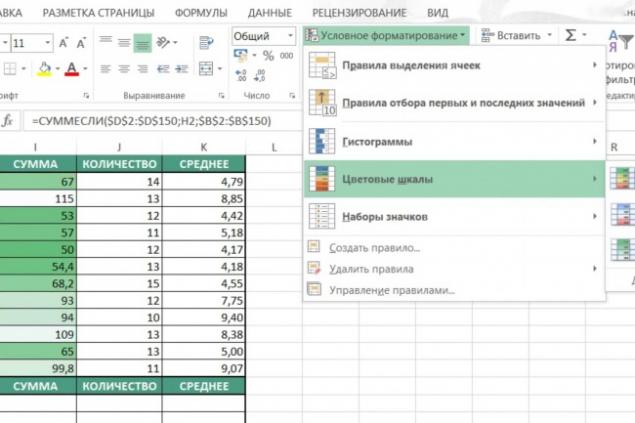
Conditional Formatting Conditional formatting allows you to quickly identify important information on the sheet.
< How to apply:
On the Home Style Conditional Formatting
For example, if you need to select all values less than 100, select Terms of cell delineation & gt; Less OK
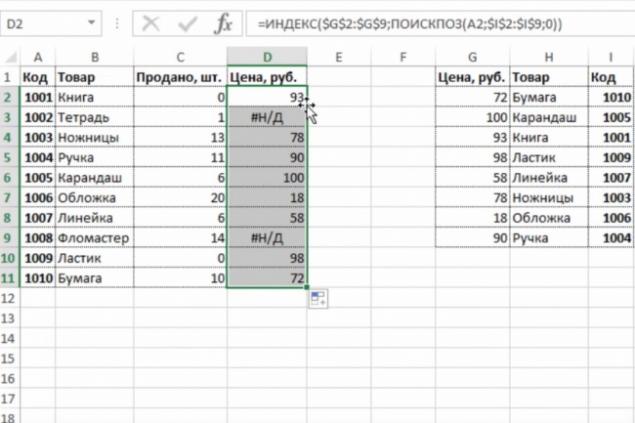
INDEX and MATCH If the CDF helps to find the desired data only in the first column, then, thanks to the functions of the INDEX and MATCH, you can search for information within a table.
< How to apply:
Make sure that the cells form a network with the data which have titles and title strings. Use the MATCH INDEX INDEX (array, MATCH (lookup_value, lookup_array, 0), MATCH (lookup_value, lookup_array, 0)) .
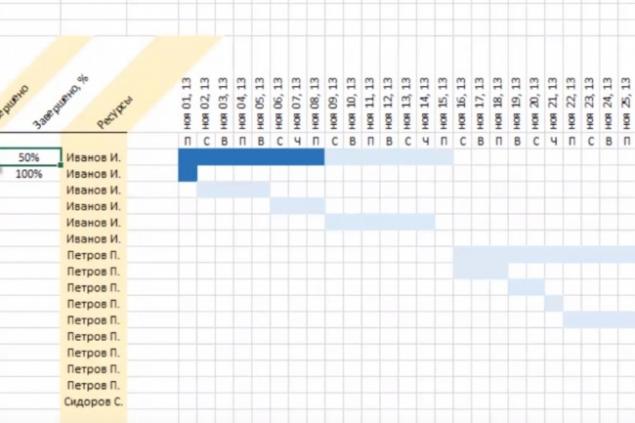
The graph "Falls» This is one of the forms of data visualization, which allows you to see which way the figures have changed over a certain period. A very useful thing for those whose work involves finances or statistics.
< How to apply:
The version of Excel 2016 is necessary to select the desired data and select Insert & gt; Waterfall Figure & gt; Waterfall
Forecast This function allows you to calculate and predict future values based on existing data.
< How to apply:
Select at least two cells that contain the initial values. Click Data & gt; Forecast & gt; forecast Sheet Create a sheet forecast End of the forecast Create
According to the materials: lifehacker.com
Translation and adaptation: Website
via lifehacker.com/seven-useful-microsoft-excel-features-you-may-not-be-us-1753221566?utm_campaign=socialflow_lifehacker_facebook&utm_source=lifehacker_facebook&utm_medium=socialflow
< How to apply:
Click Data & gt; Job Data & gt; An analysis of "what-if» & gt; Seek Set in the cell Value Changing the value cell OK
Conditional Formatting Conditional formatting allows you to quickly identify important information on the sheet.
< How to apply:
On the Home Style Conditional Formatting
For example, if you need to select all values less than 100, select Terms of cell delineation & gt; Less OK
INDEX and MATCH If the CDF helps to find the desired data only in the first column, then, thanks to the functions of the INDEX and MATCH, you can search for information within a table.
< How to apply:
Make sure that the cells form a network with the data which have titles and title strings. Use the MATCH INDEX INDEX (array, MATCH (lookup_value, lookup_array, 0), MATCH (lookup_value, lookup_array, 0)) .
The graph "Falls» This is one of the forms of data visualization, which allows you to see which way the figures have changed over a certain period. A very useful thing for those whose work involves finances or statistics.
< How to apply:
The version of Excel 2016 is necessary to select the desired data and select Insert & gt; Waterfall Figure & gt; Waterfall
Forecast This function allows you to calculate and predict future values based on existing data.
< How to apply:
Select at least two cells that contain the initial values. Click Data & gt; Forecast & gt; forecast Sheet Create a sheet forecast End of the forecast Create
According to the materials: lifehacker.com
Translation and adaptation: Website
via lifehacker.com/seven-useful-microsoft-excel-features-you-may-not-be-us-1753221566?utm_campaign=socialflow_lifehacker_facebook&utm_source=lifehacker_facebook&utm_medium=socialflow
< How to apply:
Make sure that the cells form a network with the data which have titles and title strings. Use the MATCH INDEX INDEX (array, MATCH (lookup_value, lookup_array, 0), MATCH (lookup_value, lookup_array, 0)) .
The graph "Falls» This is one of the forms of data visualization, which allows you to see which way the figures have changed over a certain period. A very useful thing for those whose work involves finances or statistics.
< How to apply:
The version of Excel 2016 is necessary to select the desired data and select Insert & gt; Waterfall Figure & gt; Waterfall
Forecast This function allows you to calculate and predict future values based on existing data.
< How to apply:
Select at least two cells that contain the initial values. Click Data & gt; Forecast & gt; forecast Sheet Create a sheet forecast End of the forecast Create
According to the materials: lifehacker.com
Translation and adaptation: Website
via lifehacker.com/seven-useful-microsoft-excel-features-you-may-not-be-us-1753221566?utm_campaign=socialflow_lifehacker_facebook&utm_source=lifehacker_facebook&utm_medium=socialflow
< How to apply:
Select at least two cells that contain the initial values. Click Data & gt; Forecast & gt; forecast Sheet Create a sheet forecast End of the forecast Create
According to the materials: lifehacker.com
Translation and adaptation: Website
via lifehacker.com/seven-useful-microsoft-excel-features-you-may-not-be-us-1753221566?utm_campaign=socialflow_lifehacker_facebook&utm_source=lifehacker_facebook&utm_medium=socialflow